Legal & insurance exposure
Counseling content and member data sent to a third party you never vetted — the kind of disclosure your liability carrier and your attorney would very much like to have been asked about first.
Built for the Executive Pastor who owns the risk
Verolith is an AI-native operating system for the church, built on one shared AI-governance layer. Your staff work with an assistant grounded in your own sermons, minutes and confessional standards, and Aligned Chat checks every draft against your Codex — showing where it holds to your standard and where it drifts. Requests run through a governed gateway under enterprise no-training agreements; switch on the Privacy Airlock and names and pastoral detail are stripped before anything leaves. Opt into a provenance session and it closes with a tamper-evident record — a signed account of what informed the answer and how it was checked against your standard.
The choice you don’t actually have
A pastor can choose never to open a chatbot. What no pastor can choose is a world where AI isn’t already writing the devotional a volunteer pastes in, the study notes a member brings to group, the newsletter copy, the answers your congregation searches for on a Sunday afternoon. Abstaining doesn’t remove AI-generated content from your ministry —it only removes your standard from it.
Our answer isn’t “use more AI.” It’s governance: the tools to make sure the AI-shaped content moving through your church is grounded in your sources, checked against your confession, and traceable to what it came from. If AI content is unavoidable, alignment shouldn’t be optional.
§ 01 · Your corpus
Your own material
Generic chatbots make things up about your church because they’ve never read it. The corpus is the layer you control — what goes in, how often it refreshes, who can see it, and what gets stored. Everything the assistant says comes back grounded in that library, with the receipt attached.
We don’t let you load ten thousand documents on day one. Bulk ingestion unlocks only after a retrieval quality check passes against your own corpus — because a library that returns the wrong passage confidently is worse than no library at all.
§ 02 · Aligned Chat
Aligned Chat
Grounded answers stop the assistant inventing your church. They don’t make itorthodox. Aligned Chat checks claims against yourCodex — the confessional standards and statement of faith you load — and shows where a draft agrees, where it diverges, and where teaching has drifted.
This is what turns “AI wrote something” into“AI wrote something we can hold to our standard.”
§ 03 · Safe Chat
The Privacy Airlock
The Airlock is an optional scrubbing control — off by default — that you, or your organization’s policy, can switch on per surface. Enabled, it runs on our infrastructure in front of the model call: in three passes it removes what should never leave your walls — then lets a useful, fully reconstituted answer back in.
Names, emails, phone numbers, addresses, dates. The structural identifiers any compliance team expects to be removed — gone before the prompt leaves our gateway.
Infidelity, abuse, addiction, a minor’s name, a family in crisis. Secular DLP was built to catch credit-card numbers; it is blind to the narrative pastoral detail that actually creates liability in a church. This is what we built for.
Every sensitive span is swapped for a reversible placeholder, so the external model only ever sees “PERSON_1.” The real text is restored on our side, after the response returns — never in the prompt that egresses. The map that makes the swap reversible lives in a dedicated, isolated store — kept apart from every other church’s and from the billing ledger, and discarded shortly after the exchange.
An enabled Airlock is fail-closed. If any part of the scrubber errors or drops offline, the request is terminated on the spot — never forwarded un-scrubbed. When it’s on, it fails safe, not open. That single rule is the difference between a privacy promise and a privacy product.
§ 04 · Provenance
The risk you can’t see
A counseling conversation. A member’s marriage in crisis. A giving record. A minor’s name. Typed into a consumer AI tool that may retain it, train on it, or surface it later. You can’t un-send it — and today, you may never even know it happened.
Generic enterprise DLP was built to catch credit-card and Social-Security numbers. It is blind to the thing that actually creates liability in a church:the narrative of someone’s worst week, written in plain language.
Counseling content and member data sent to a third party you never vetted — the kind of disclosure your liability carrier and your attorney would very much like to have been asked about first.
People tell their church things they tell no one else. A confidence that leaks into a vendor’s training set isn’t a bug report — it’s a betrayal of the relationship your ministry runs on.
One headline about a congregant’s private crisis surfacing from an AI tool undoes years of carefully built trust — and travels fast through exactly the peer networks you sell into.
Built for the risk owner
That’s the exposure. Here’s what you get to contain it. The Lead Pastor will love what it does — but you’re the one who has to defend it to the board, the insurer, and the IT director.
You don’t wire up a model vendor or hand a corporate card to an AI company. Inference and search are run on your behalf inside Verolith, and foundation-model traffic rides Google Cloud Vertex AI under our executed enterprise data-processing agreement, with retention-for-training contractually disabled — not a self-serve toggle, an executed contract.
Who ran what, and when — never the content itself. The “who did what” record your access reviews, your board, and your insurer ask for.
When a staff member or student opts into a provenance session, every prompt and reply is captured as a tamper-evident, hash-chained record of exactly what egressed — scrubbed where the Airlock was on, raw where it wasn’t. They export a signed bundle a supervisor, grader, or board can verify independently. Admins see that a session happened; never what was in it.
Staff authenticate through your existing identity provider — Google Workspace, Okta, or Microsoft Entra — over single sign-on that’s live today. No new passwords, no shadow accounts, no tool sprawl for your IT director.
Directory Sync provisions access from the groups you already manage. Add someone to the right group and they’re in; remove a departing staff member and their access goes with them — no separate user list to keep in step by hand.
Each church’s data lives in its own isolated tenant — never visible to another. Isolation scales from a shared schema to a dedicated database without changing how it works, and even the short-lived map that reverses the Airlock’s placeholders runs on its own isolated store.
A per-tenant budget ceiling means a runaway script or a compromised login can’t quietly drain your AI budget. Predictable cost is a first-class feature, not an afterthought.
Isolated data, no raw-prompt logging in our observability tooling (search logs keep an unsalted hash of the query, which can be reversed for short queries), ZDR routing — architected to the standard from day one. Formal certification follows our first paid pilots; we won’t blur the line.
How it works
The Airlock is opt-in, per user and per surface — here’s a request with it switched on. Like an airlock on a spacecraft, nothing moves between your people and the outside model without passing through a sealed, controlled chamber — in both directions.
On an Airlock-on turn, the only text that crosses to the model is already anonymized. The mapping back to real names lives only on our side, in tenant-scoped storage, and expires on a short timer.
See it
Every screen below is the shipped dashboard. We build an integrity product, so the imagery holds to the same standard as the claims.
The Airlock, working
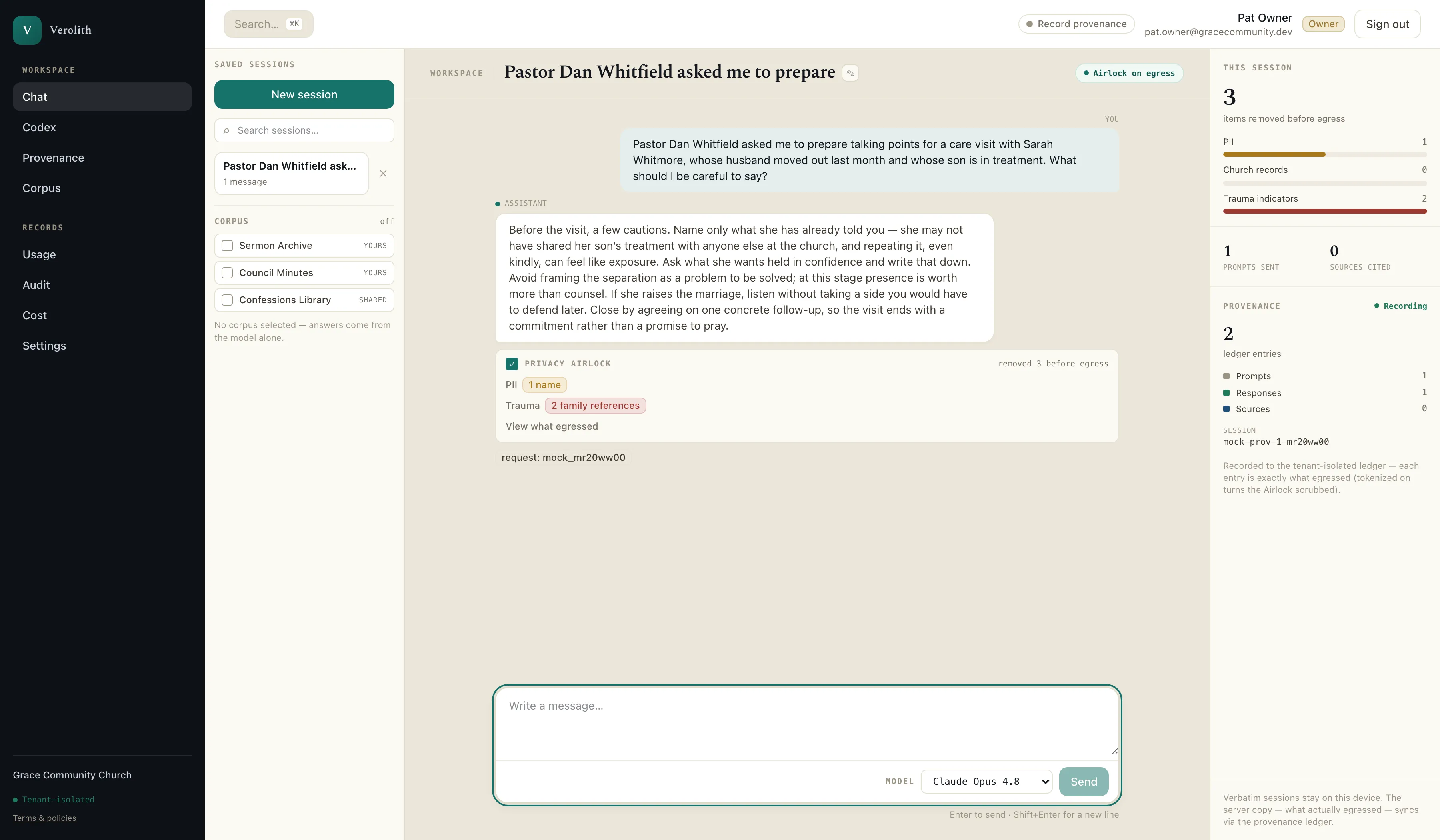
A pastoral question goes in as it was actually written — a name, a marriage coming apart, a son in treatment. With the Airlock switched on for this surface, the rail on the right counts what was stripped before anything egressed, and “view what egressed” shows the tokenized text the provider actually received. The reply comes back complete, reassembled on our side.
Proof of how AI was used
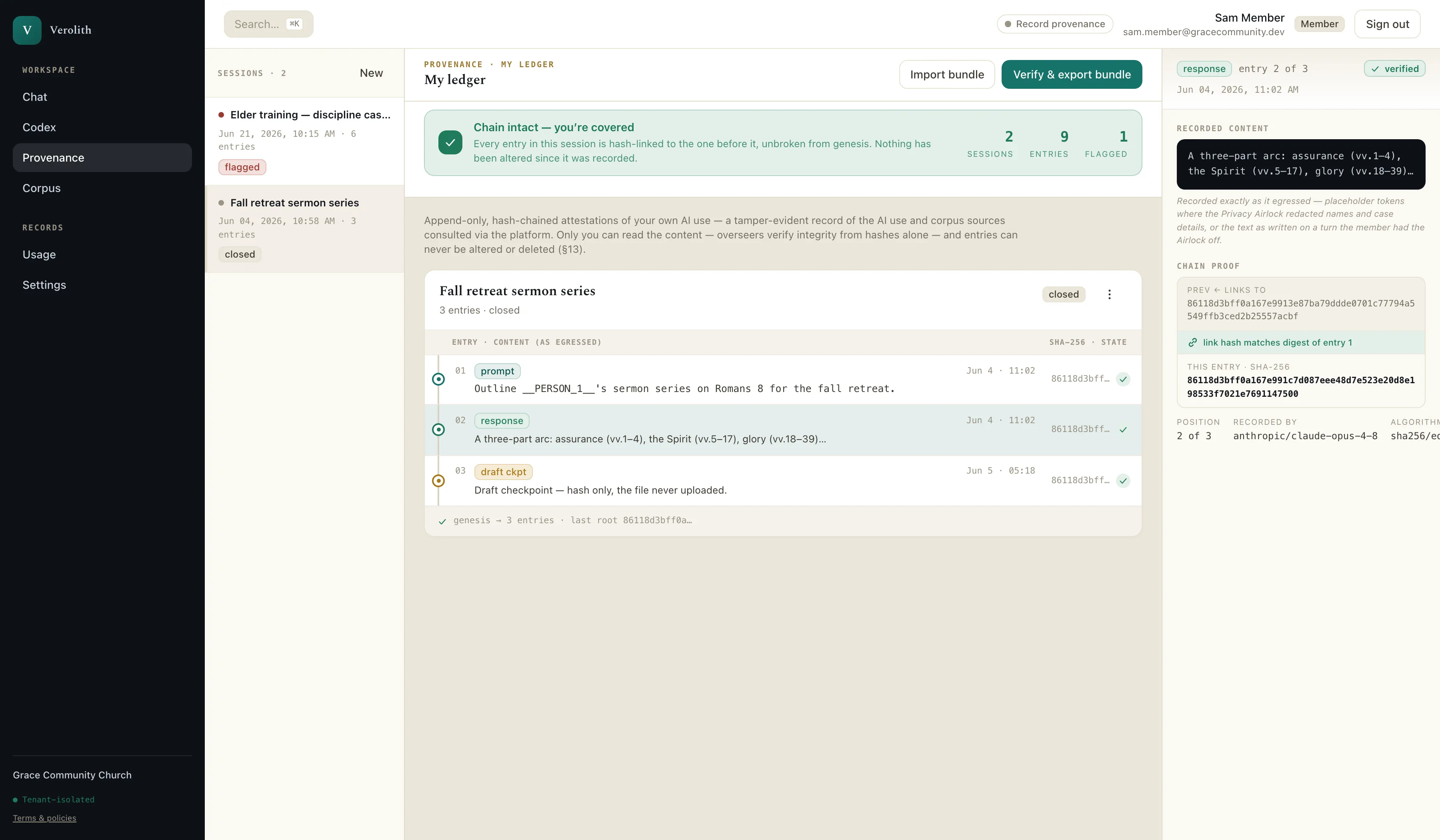
Inside an opt-in session, every prompt and reply is hash-chained to the one before it. A reviewer verifies the chain from the hashes alone — the content stays the member’s. Where the Airlock redacted a name, the ledger stores the placeholder — so on those scrubbed turns, even the record of the conversation holds no one’s details.
Your own material
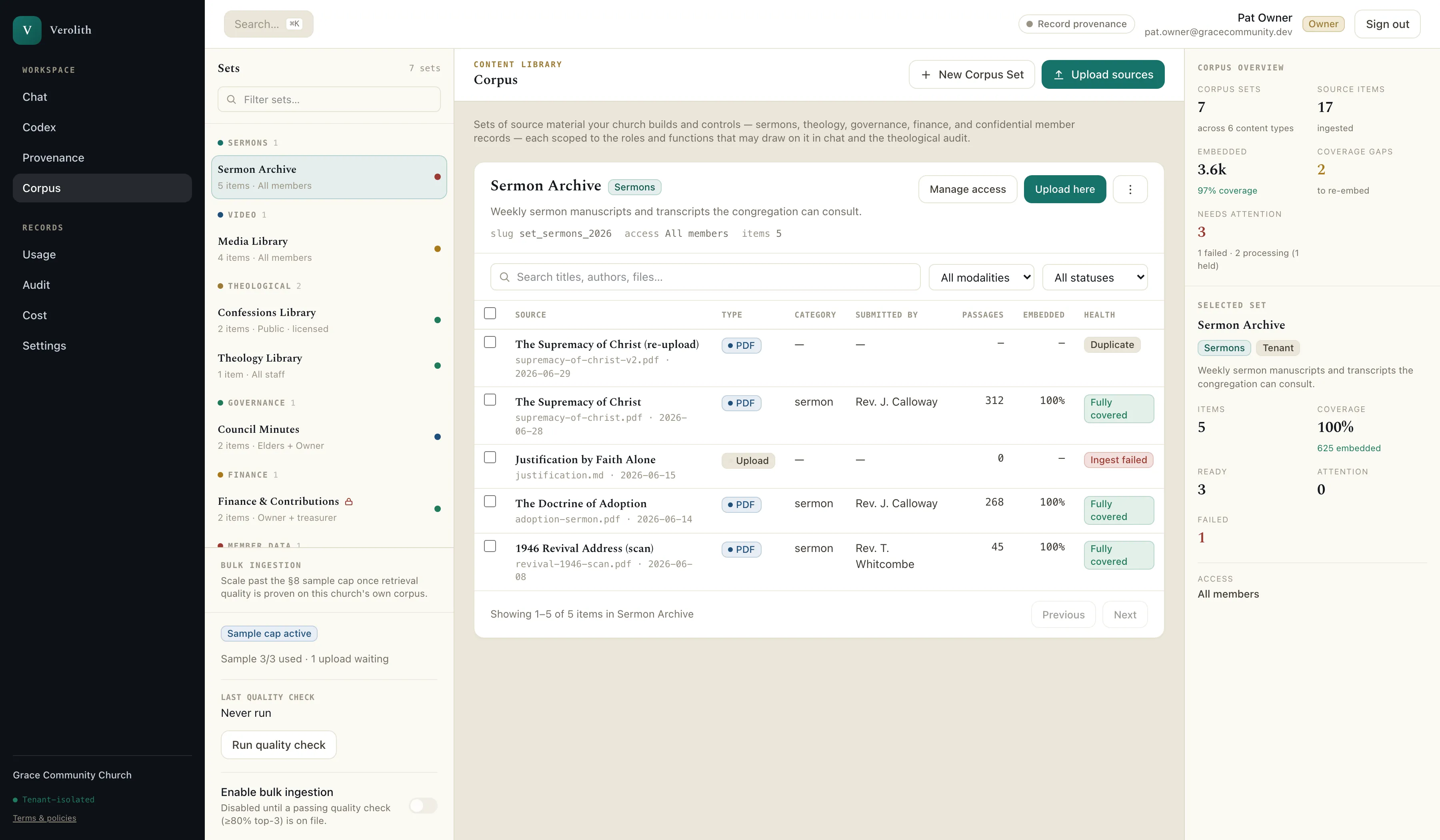
Sets of your church’s own source material, each with its own access scope, so the finance file and the pastoral-care file are not equally reachable. Ingestion state is visible per item: what is embedded, what needs re-embedding, what failed and why.
Spend governance
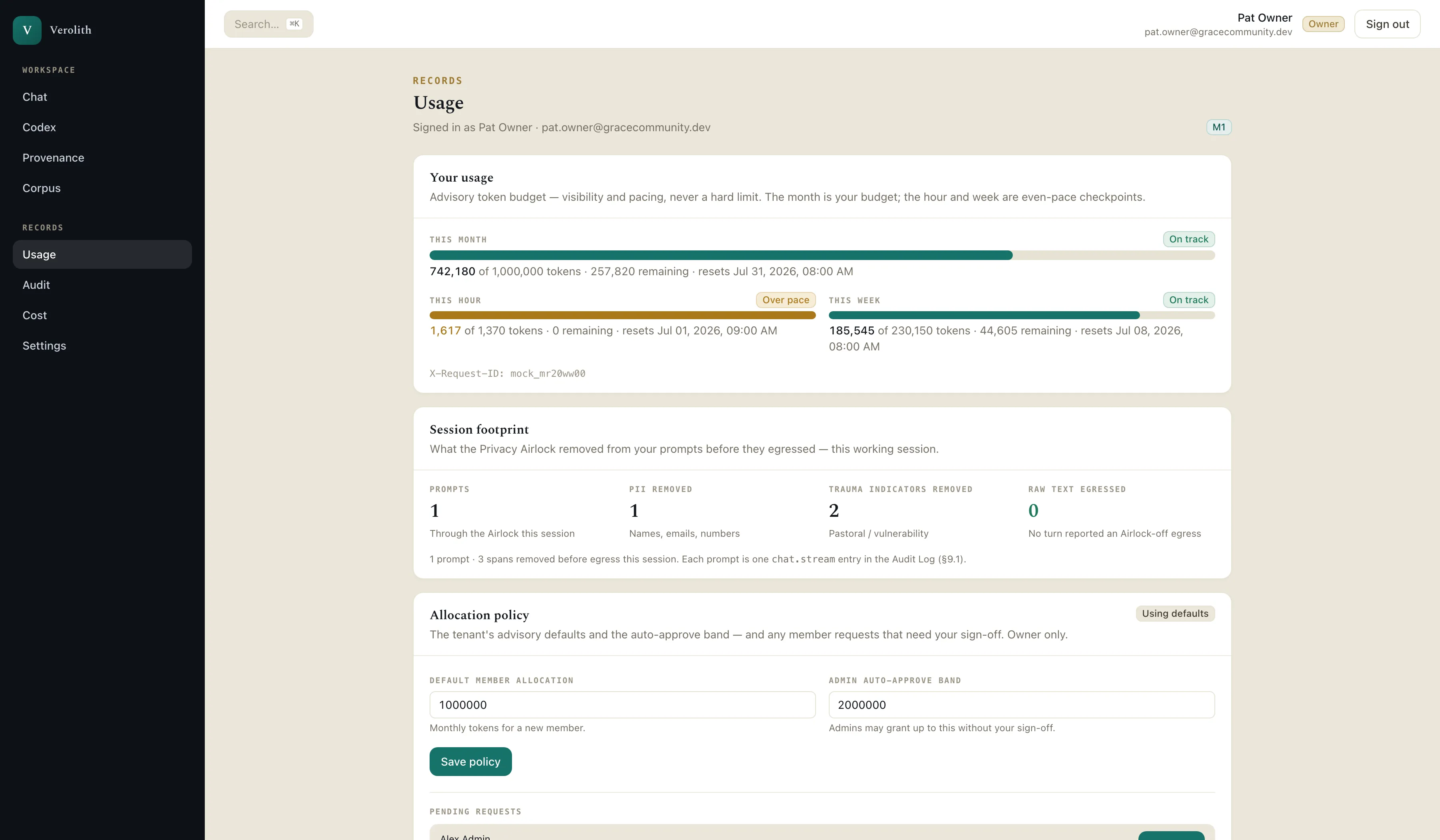
Advisory token budgets pace the month rather than cutting staff off mid-sentence. Alongside them, the session footprint reports what was removed before egress — including how many turns egressed raw text, the number an Airlock-on session keeps at zero.
For your access reviews
A durable per-tenant record of activity, filterable and exportable to CSV for the access review your insurer or your board asks for. Identifiers and token counts only; the content of a prompt is never in this table, by design.
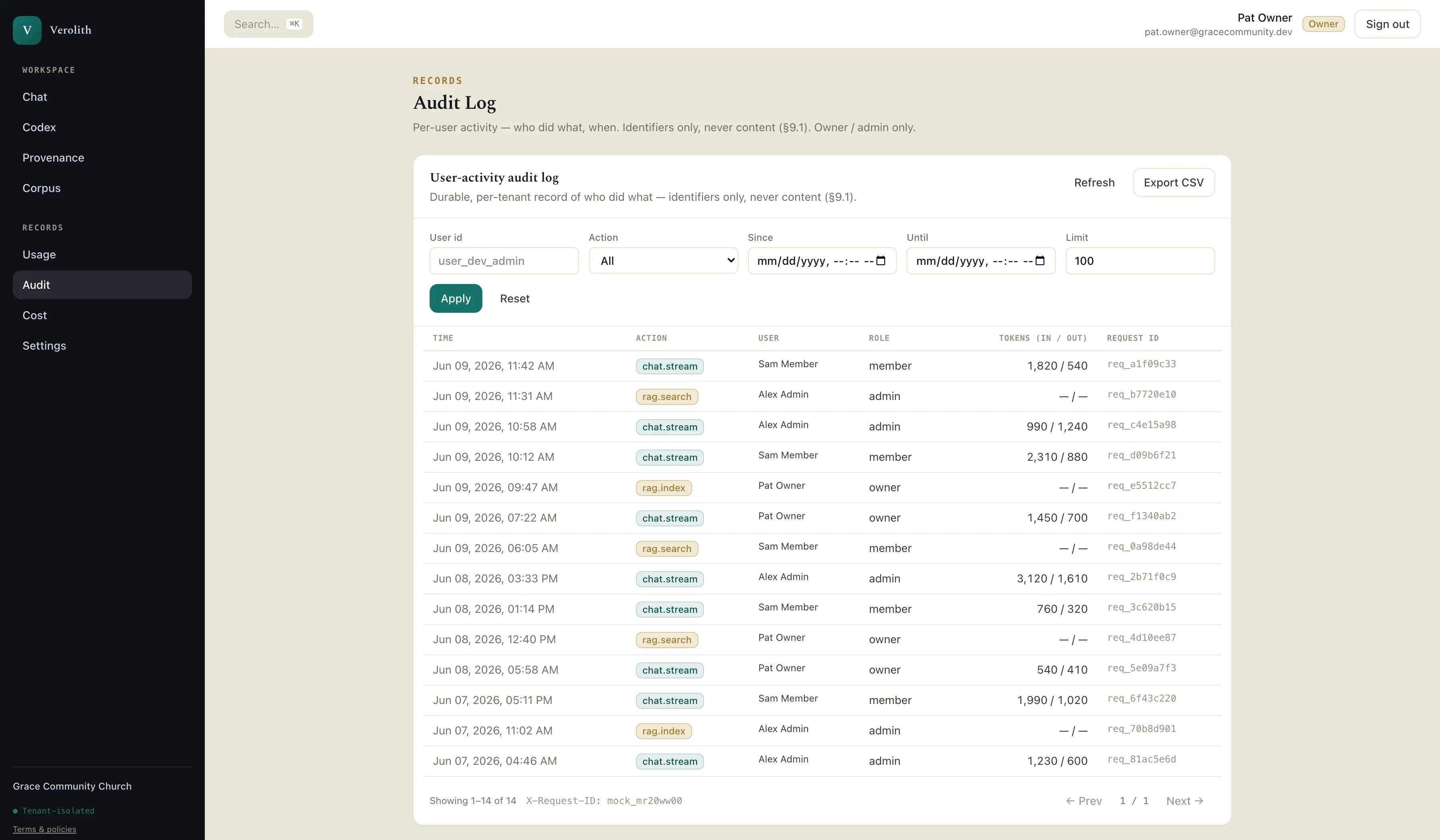
Screenshots are of the shipped product, captured against a demonstration tenant. “Grace Community Church,” its staff, and its documents are fictional — no real pastoral content appears in any image. Assistant replies shown are representative.
Precision over hype
You’re buying integrity. So we won’t sell it with claims we can’t stand behind. Here’s how we talk about the hard parts.
We won’t tell you “nothing is ever stored.” Foundation-model inference runs on Google Cloud Vertex AI under our executed data-processing agreement, with retention-for-training disabled.
Even then, “zero” isn’t literally zero. A provider may still retain a request that’s flagged for safety review, or where the law requires it. We say that out loud rather than burying it.
We’re designed for SOC 2 Type II — not yet certified. We’ll always tell you which is which, and show you exactly where we are in the process.
Pricing
We count users so you can run access reviews, audit activity, and true-up at renewal. We never bill by them. Counting is what makes a flat license safe to operate — it’s free to you.
You pay a predictable enterprise fee based on your church — not a meter that climbs every time you add a staff member.
Per-seat pricing tempts you to leave your most overworked junior staff off the platform — the exact people most likely to paste something they shouldn’t. So we don’t price that way.
Token costs pass straight through at cost, governed by a budget ceiling you control. We don’t mark up the AI; we secure it.
Enterprise churches buy by PO and invoice. Tell us your size and we’ll scope a license.
Talk to us about a licenseQuestions a careful buyer asks
The hard ones, answered the way we’d want them answered if we were buying.
No — and we won’t claim that. Foundation-model inference runs on Google Cloud Vertex AI under our executed data-processing agreement, with retention-for-training disabled. A provider may still retain a request that gets flagged for safety review, or where the law requires it. That’s the honest answer, and it’s still a dramatically smaller footprint than a staff member pasting into a consumer chatbot.
No. The endpoints we route through have retention-for-training contractually disabled at the organization level. That contract is the foundation of the whole product.
In a private web app, reached through your church’s own single sign-on — nothing to install on anyone’s computer, no new account to create. Staff sign in with your existing identity provider — Google Workspace, Okta, or Microsoft Entra — using the login they already have, so there’s nothing new to remember. Every request is routed through the governed gateway before any external model sees it — and the optional Privacy Airlock, off by default, can be switched on per surface to scrub prompts on the way out. Directory Sync provisions access from the groups you already manage and removes it when someone leaves, so IT doesn’t maintain a second user list.
Your tenant’s data is isolated to your church and never visible to another. Every request — including one grounded in your own sermons or records — still runs on the same Google Cloud Vertex AI rail under our data-processing agreement, with retention-for-training disabled, as any other traffic; and when the Airlock is on, that content passes through the same scrubbing as a typed prompt before anything egresses.
The scrubbing — when you switch it on — happens on the way out to the model; that’s what makes it an airlock rather than a censor on your own filing cabinet. Your church’s records stay your church’s records, and what leaves an Airlock-on turn is de-identified.
No — and that’s rather the point. Whether or not your staff ever open it, AI-shaped content is already reaching your church: in the devotional a volunteer pastes in, the study notes a member brings to group, the answers your congregation searches for. Abstaining doesn’t remove that content; it only removes your standard from it. Verolith is how you hold it to one.
Yes. A staff member or student can work inside an opt-in provenance session: every prompt and AI response is captured as a tamper-evident, hash-chained record (the exact text that egressed — scrubbed where the Airlock was on), and they export a signed attestation bundle anyone can verify independently. It’s an honest record of AI use through the platform — it can’t prove what someone did in another tab, and we don’t claim it does. Admins see that a session happened, never its contents.
We are designed for SOC 2 Type II from day one — isolated data, no raw-prompt logging in our observability tooling (search logs keep an unsalted hash of the query, which can be reversed for short queries), ZDR routing. Formal certification follows our first paid pilots. We won’t blur the line between “designed for” and “certified,” and we’ll show you exactly where we are.
You do. You load your own confessional standards and statement of faith as your Codex — Book of Concord, Westminster, your own statement — and Aligned Chat checks drafts against it, showing where they agree, where they diverge, and where teaching has drifted over the years. It doesn’t claim neutrality, and it shows its work with citations.
Get the conversation started
We’ll walk you and your IT director through the Airlock, the audit trail, and exactly where we are on compliance — no overclaiming, no pressure.